

The popping sound made by a subwoofer can be rather intimidating especially when it just pops without you doing anything to it or to your other audio components. I have my fair share of experience with my subwoofer making popping sound but it usually happens when it snaps back to “on” from “stand-by” mode after receiving an audio signal. So usually I am mentally prepared for it and won’t get startled.
In this article, I am going to reveal to you a few scenarios and how you can troubleshoot, and ultimately fix the issue. Hopefully, you will find a similar situation here and put a stop to your subwoofer popping sound. Even if the situations found here are different from yours, you can still follow the basic troubleshooting guide, you won’t know it might actually isolate the problem and one of the solutions can actually help you.
Table of Contents
Basic Troubleshooting
Before you go through the whole article, you might want to start troubleshooting first and see if you could isolate the problem.
Subwoofer Swap
This could be the quickest way to identify if is your subwoofer that is causing the issue. Swap out the subwoofer with another subwoofer that is working fine with no issue, connect the ‘new’ sub the same way using the same cables. You may also need to adjust the setting to have similar crossover, gains, etc. If after swapping the subwoofer, the popping sound has stopped then that means it was the fault of the previous subwoofer and not your other audio components.
Change Subwoofer Cables
Change the connecting subwoofer cables and do a test run. If the problem stop, that will mean it was fault of the previous connecting cables.

Image Source. The above image is licensed under the Creative Commons Attribution-Share Alike 3.0 Unported
Turn off nearby electronic devices
Turn off the electronic devices that are in close proximity to the subwoofer as they may interfere with the sound. If there’s no more subwoofer popping sound, then switch back the turned-off electronic devices one by one to pinpoint the culprit.
Check Subwoofer Cables
Check if the subwoofer cables are touching other electrical cords and move them away. Do a test to see if this is the cause.
Swap out AV Receiver
If you do not have a spare subwoofer but have a spare AV receiver that is working normally, maybe you can try swapping the spare AV receiver with the current one. From there, you can do a test to see if it is the AVR that is causing the subwoofer to make the pop sound.

After trying the above troubleshooting methods and all leads to the fault of your subwoofer. You may want to continue reading the remaining article, as I am going to reveal the various scenarios that lead your sub to make the popping sounds and what are the potential fixes.
Changing Audio Inputs and Sound/Music Modes
This could be the most common causes of all. Whenever you are changing audio input or sound/music mode, a pop can be heard from your subwoofer. By right, an AV receiver would have muted all pre-out jacks for a short period of time whenever you change the audio input or sound/music mode. If it doesn’t, this could be because of the faulty diode and/or circuitries.
You may want to lower the bass level first, this is only useful for minimizing the loudness of the popping sound. Depending on the brand/model of the AV receiver you are using, you should be able to manually set each audio input to the audio signal that it will be receiving and not use the auto-detect selection. Once you are done with the manual setting, you should do a test to see if the problem still persists. If it does, then you might want to send your AVR to the manufacturer service center to have a thorough look at the circuitries by a qualified technician.
Subwoofer pops by itself
All your home audio components are off but your subwoofer still makes the popping sounds every now and then. This is a very odd occurrence since there are zero audio signals at play here. You can try disconnecting the subwoofer from the AVR by removing the subwoofer cable, and see if the subwoofer still makes the pop sound. If it didn’t work, then we are left with a few more options.
It could be the power outlet issue, you should try using another one and/or use a better surge protector as well. If the problem persists, try going through the basic troubleshooting in this article. Changing the power mode from “Auto” to “On” could help too. Just that you’ll need to manually off the subwoofer whenever you are not using it. Sometimes the subwoofer Auto on/off circuitry is not working properly, you might want to have your subwoofer serviced.
Wireless Subwoofer Module
If you are using a wireless subwoofer, then it could possibly be other devices and home appliances that are interfering with the connection. You can try connecting the subwoofer directly to your amplifier first and see if the problem persists. If it doesn’t, then you can start troubleshooting by turning off various devices/home appliances one by one while your subwoofer is connected wirelessly. Does it sound tedious? You can also start by removing all devices from the room first if the problem persists then slowly work on other home appliances. If the problem doesn’t persist, then the fault will be one of your devices, probably the ones using WiFi/Bluetooth connections.

Faulty Subwoofer Amplifier
If you do not have any spare subwoofer or AVR, you can use this trick to isolate the problem. Use a working RCA cable to connect your DVD player and subwoofer together. Lower your subwoofer amp volume down first. Then start playing something on your DVD player and slowly turn up the subwoofer amp volume till you can hear music. When you hear a popping sound again, then it would be the subwoofer amplifier fault. You will need to send the subwoofer for repair in this case.
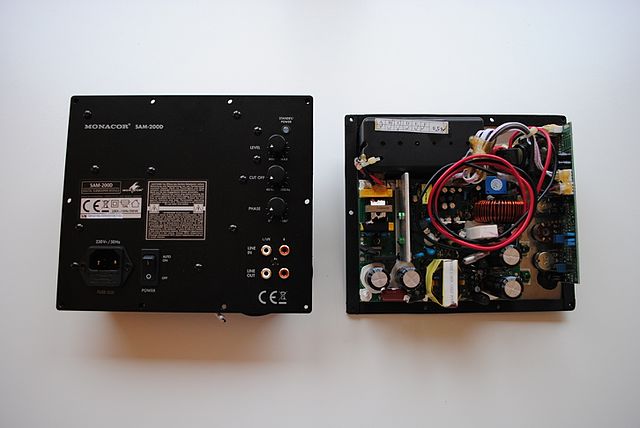
It is a sweet trick, but is a pity we can only determine if it is the subwoofer amplifier creating the problem.
In Conclusion
There are many causes that will make your subwoofer create popping sounds, and fortunately, some of them can be solved with simple fixes. There are also times we have no choice but to send the sub for repair. With the various troubleshooting methods I have shared, hopefully, you were able to isolate the problem and at least send the right audio component for repair or to be replaced. I know some people who just live with it but I will recommend having these problems be fixed as it could lead to even bigger problems.

